


Tripsil is built for group travel. TripIt is built for business travel. If you’ve been comparing them like they’re competing for the same job, they’re not. This guide ends the confusion.
TL;DR: Tripsil vs TripIt at a Glance
| Category | Tripsil | TripIt |
| Best For | Friend groups, families, leisure trips | Business travelers, frequent fliers |
| Price | ✅ Free, | Free tier + $49/year for useful features |
| Group Features | ✅ Full collaboration tools | Limited (Inner Circle sharing only) |
| Expense Splitting | ✅ Built-in | Not available |
| Email Import | Not available | ✅ Class-leading email parsing |
| Flight Alerts | Not available | ✅ Pro only |
| Real-Time Collaboration | ✅ Live itinerary editing | View-only sharing |
| Offline Access | ✅Available | Pro only |
| Platform | IOS + Android | ✅ IOS + Android + Web |
What Is Tripsil?

Tripsil is a free Group Trip Planning App for iOS and Android. It exists because coordinating a trip with multiple people across five different apps is a mess, and nobody wants to manage a shared Google Doc, a group chat, Splitwise, and Google Maps simultaneously.
The app brings itinerary building, expense splitting, group chat, and a shared memories album into one place. You get a day-by-day shared timeline that everyone in your group can edit in real time, multi-stop destination support, and Google Maps integration baked directly in.
It is genuinely free. No subscription tier, no paywall on core features. That alone puts it in a different category from most travel tools.
Who gets the most value from Tripsil:
- Friend groups planning a shared trip where nobody wants one person to control the whole itinerary
- Families coordinating across different devices and comfort levels with tech
- First-time trip organizers who need structure without a learning curve
- Anyone currently splitting their trip planning across three or more separate apps
What Is TripIt?

TripIt is a travel organizer built primarily for business travelers and frequent fliers who book a lot of trips independently. Its central feature is email parsing: you forward a booking confirmation to plans@tripit.com, and TripIt automatically builds a structured itinerary from it. That sounds simple. In practice, it works remarkably well across flights, hotels, and car rentals.
The free tier gives you the itinerary builder and email import. The $49/year Pro plan unlocks what most frequent travelers actually want: real-time flight alerts, seat tracking, fare refund notifications, alternate flight suggestions, airport maps, and a points and miles tracker.
TripIt is not a group planning tool. It is a personal travel organizer designed to reduce friction for people who live on planes.
Who gets the most value from TripIt:
- Business travelers booking five or more trips per year
- Frequent fliers who need real-time flight status updates
- Solo professionals who forward booking confirmations and want everything organized automatically
- Anyone who wants to track miles and points across programs in one place
- Travelers who frequently deal with delays and need alternate flight options fast
Feature-by-Feature Breakdown
Trip Planning and Itinerary Building
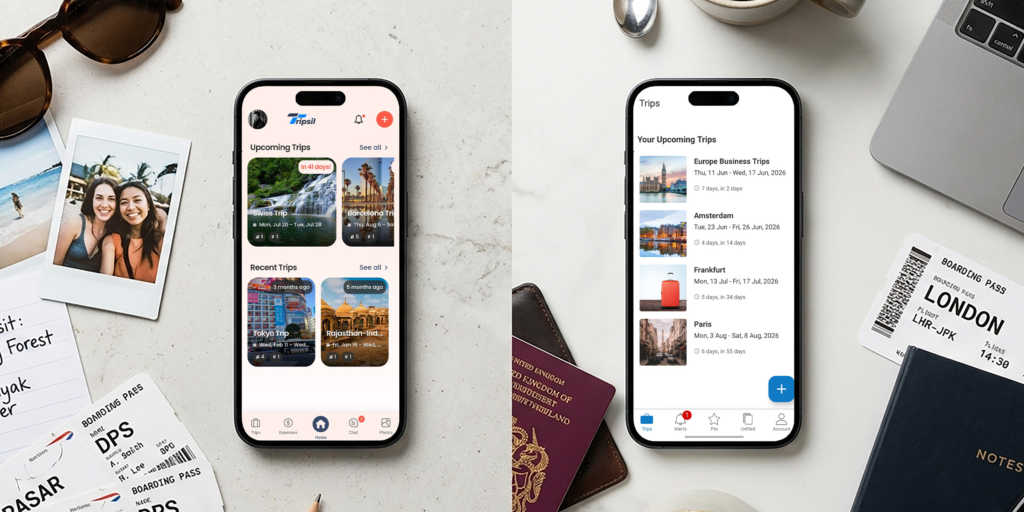
Tripsil gives you a shared day-by-day timeline where everyone in the group can add, edit, and rearrange plans in real time. It supports multiple destinations and integrates Google Maps directly, so you can go from “where should we eat on day two” to a pinned location without leaving the app.
TripIt builds your itinerary for you from email confirmations. You do almost no manual input. The output is a clean, structured master itinerary that covers flights, hotels, ground transport, and anything else you forward in. For solo travelers with multiple bookings, this is genuinely faster than building anything by hand.
Neither approach is better in a vacuum. They solve different planning styles.
Expense Management
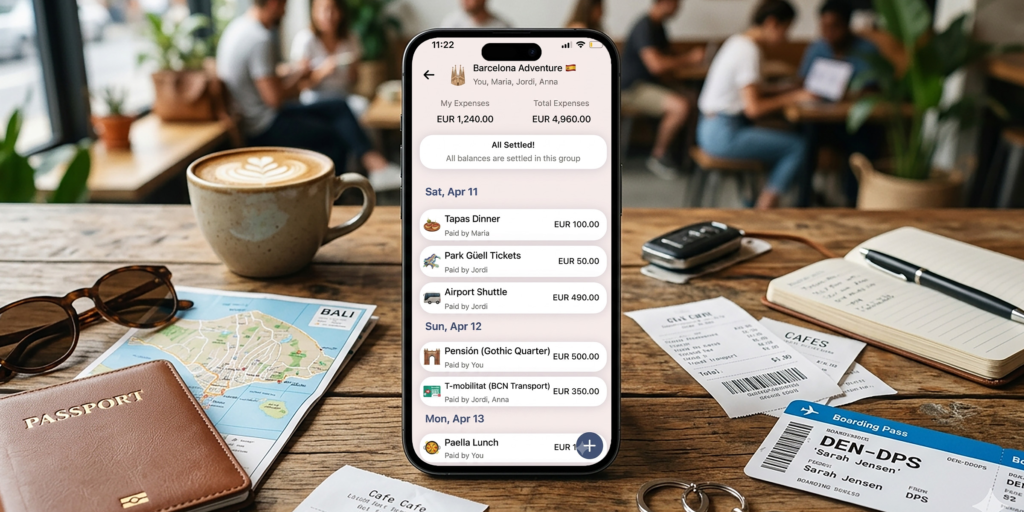
Tripsil has built-in expense splitting. For group trips where four people are sharing costs, this removes the most common source of post-trip friction.
TripIt has no expense splitting feature. It does not track shared costs and does not help groups settle up. If you are using TripIt for a group trip, you will need a separate tool for this.
This is a significant limitation of TripIt for travelers who need to manage shared finances during group trips.
Group Collaboration
Tripsil is designed from the ground up for groups. Real-time itinerary collaboration, a shared group chat, and a collective memories album all sit inside the same app. Everyone on the trip can participate, not just view.
TripIt offers Inner Circle trip sharing, which lets you share your itinerary with selected contacts. That is view-only access. Collaborators cannot edit the itinerary, add plans, or communicate within the app.
If you need actual collaboration rather than just visibility, Tripsil is the only option between these two.
Email and Booking Import
This is where TripIt genuinely leads. Forward a confirmation email to plans@tripit.com and TripIt parses it into a structured event automatically. It handles flights, hotel reservations, rental cars, and more. The accuracy is high, and the speed is close to instant.
Tripsil does not have this feature. You build your itinerary manually. For leisure trip planning, that is usually fine since you are constructing a shared plan anyway, not just logging confirmed bookings.
For business travelers with high booking volume, TripIt’s email import is a meaningful time saver that Tripsil cannot match.
Flight Tracking and Alerts
TripIt Pro includes real-time flight alerts, seat tracking, fare refund notifications, and alternate flight suggestions. For frequent fliers, these are not novelty features. They matter when your flight is delayed and you need options fast.
Tripsil does not include flight tracking or alerts. It is a trip planning and coordination tool, not a flight monitoring service.
If real-time flight data is something you depend on, this is a genuine gap in Tripsil’s offering.
Pricing and Value
Tripsil is free. No tier system, no annual fee. All core features are available without payment.
TripIt has a free tier that covers the itinerary builder and email import. But the features that make it worth using for frequent travelers, including flight alerts, offline access, seat tracking, and the points tracker, all sit behind the $49/year Pro subscription.
Whether $49/year is worth it depends entirely on how often you fly and how much friction those Pro features remove. For someone booking one or two leisure trips a year, probably not. For a business traveler on 10+ trips annually, the flight alert and refund tools alone could justify the cost.
Who Should Choose Tripsil
- You are planning a trip with a group of friends or family and need everyone aligned on the itinerary without a designated “trip coordinator” doing all the work
- You want expense splitting handled inside the same app where you are planning
- You are organizing a multi-destination trip and need a shared view everyone can edit
- You are done switching between a notes app, a chat thread, Splitwise, and Google Maps for every trip
- You want a travel planning tool that costs nothing and does not ask for a credit card
Who Should Choose TripIt
- You travel frequently for work and book five or more trips per year
- You want your booking confirmations automatically converted into structured itineraries without manual entry
- You need real-time flight status updates and alerts when things change
- You want to track miles and points across multiple loyalty programs in one place
- You travel solo and need a reliable personal organizer rather than a group coordination tool
FAQ
Is Tripsil free?
Yes. Tripsil is free on iOS and Android with no subscription required. All core features, including the shared itinerary, expense splitting, group chat, and memories album, are available at no cost.
Does TripIt have expense splitting?
No. TripIt does not include expense splitting or any shared cost tracking. If you are using TripIt for a group trip, you will need a separate app to manage shared finances.
Which is better for group trips?
Tripsil. It is built specifically for group travel with real-time collaborative itinerary editing, expense splitting, and group chat in one place. TripIt’s sharing features are view-only and designed for individual travelers who want to keep contacts informed, not for groups building a trip together.
Is TripIt Pro worth $49 per year?
It depends on your travel frequency. If you fly regularly for work and deal with delays, cancellations, or fare changes, the Pro features including real-time flight alerts, seat tracking, and fare refund notifications provide real utility. For occasional leisure travelers, the free tier is likely enough, and $49/year is hard to justify.
What makes Tripsil different from TripIt?
Tripsil and TripIt solve different problems. Tripsil is a group coordination tool that brings itinerary planning, expenses, and communication into one place for trips you take with others. TripIt is a personal travel organizer built for frequent individual travelers who want their booking confirmations automatically structured and their flights monitored. The comparison only makes sense if you are trying to figure out which fits your travel style, not which is objectively better.
Final Verdict
Stop looking for a single winner here. These two apps are not fighting for the same user.
If you are planning a trip with other people and currently juggling multiple apps to keep everyone on the same page, Tripsil is the cleaner solution. It is free, it handles the coordination and the money in one place, and it does not require everyone to subscribe to anything.
If you are a frequent solo traveler or business flier who needs automatic itinerary building from email and real-time flight monitoring, TripIt earns its place. The Pro tier’s value is real for the right user.
Know which one you are before deciding. Most people reading this are planning a trip with others. If that is you, try Tripsil for free and stop splitting your trip across five apps.